Smart Locations
Breaking change: instanceDiscovery().getConfiguration() is removed, and
create_smart_location_measurements / ping_locations now take their configuration as a parameter.
See Migrating: configuration is now a parameter
for what to call instead. This does not affect sdkManager.getConfiguration(), used below for
the network name and id.
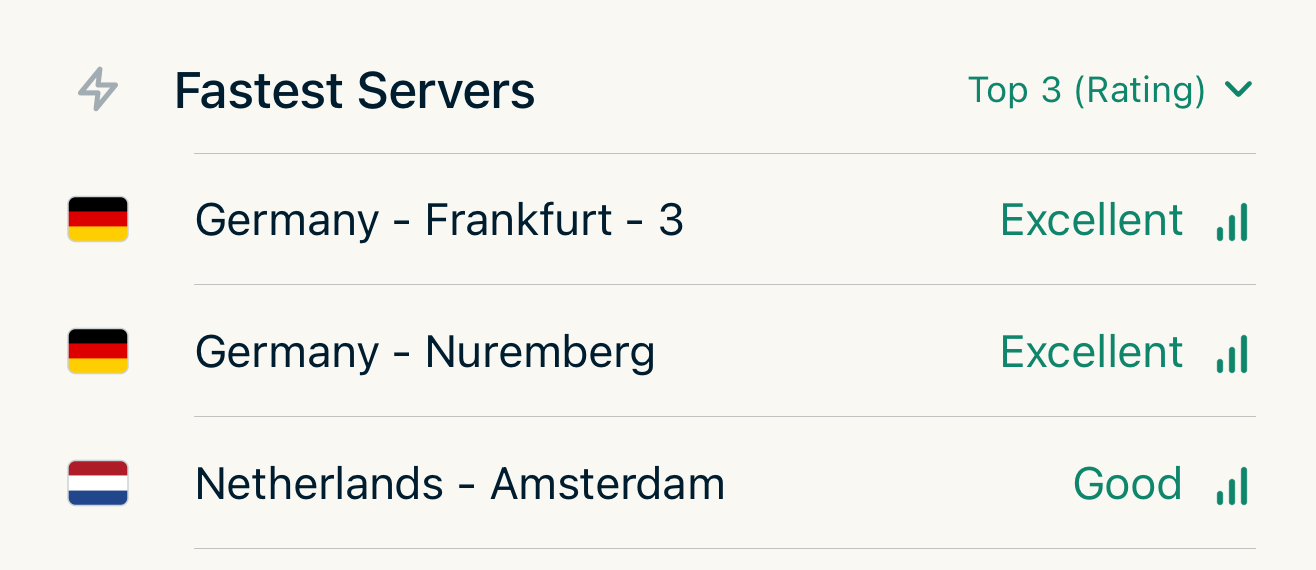
Smart Locations are designed to identify the fastest servers tailored for individual customers. The definition of "fast" encompasses a variety of factors, which are detailed in the implementation of the Smart Location Algorithm.
Caching for Smart Locations
The SDK will internally cache smart locations for 30 days. It will internally use
- Country
- Region
- ISP Name
- Autonomous System Number (ASN)
- WiFi SSID or Network Name
- WiFi BSSID or Network Name
It will therefore rely on the get_user_location() method, to obtain the user's current network parameters. As these network parameters cached as well, it's important to tell the SDK, of the user's network change by calling the SDK Manager networkChanged() method.
However, the SDK can't obtain the WiFi SSID or BSSID, so it's important that apps keep this values up to date when switching between networks, by updating the SDK Managers configuration object:
let config = kapeSDKManager.getConfiguration()
// WiFi SSID of the current network
config.setCurrentNetworkName(name: "Starbucks")
// WiFi BSSID of the current network
config.setCurrentNetworkId(name: "aa:bb:cc:dd:ee:ff")
The two are different setters. Writing the BSSID through setCurrentNetworkName leaves the
network id empty, and the cache then matches at the ASN level for every network on that ISP — so a
result measured on one WiFi is served for the next. This is the same configuration object as
sdkManager.getConfiguration() elsewhere in these docs; it is unrelated to the per-measurement
configuration described under Measuring Performance.
In a Non-WiFi environment, the network name could the Windows Network Profile Name and the network id could be the mac address of the router. These parameters are optional and just help to further segment the cache results.
Matching cached records
The internal Network Cache Manager uses a multi-step logic to match a cached result with the current network of the user.
- Try to match Country, Region, ISP, ASN, SSID, BSSID if no results returned continue with 2.
- Try to match Country, Region, ISP, ASN, SSID, if no results returned continue with 3.
- Try to match Country, Region, ISP, if no results returned continue with 4.
- Try to match Country, Region, if not results returned continue with 5.
- Try to match Country, if no results returned RETURN NO ENTRY else continue with 6.
- If results are returned, use the most recent result, determined by the date and time they’ve been added
has_smart_locations
Returns whether there are cached, non-expired Smart Location results for the current network.
This uses exact matching only — no fuzzy fallback. If networkName/networkId are not
set in the configuration, matching stops at the ASN level.
This allows the host app to determine whether a Smart Location test needs to be run before showing the server list.
Parameters
None. Network parameters are read from the configuration.
Returns
Bool — true if valid cached results exist, false otherwise.
has_preferred_protocol
Returns whether there are cached, non-expired Preferred Protocol results for the current network.
Parameters
| Name | Type | Description |
|---|---|---|
| for_location | String? | If provided, checks for that specific location. If nil/null, checks for any cached entry. |
Returns
Bool — true if valid cached results exist, false otherwise.
Measuring and ranking Smart Locations
Finding the fastest locations is split into two independent steps:
- Measure —
create_smart_location_measurements(...)runs (or serves from cache) the raw measurements and returns aVec<ClusterMetrics>. These are pure measurements, with no rating. - Evaluate —
rank_smart_location_measurements(...)scores those measurements and returns a best-first Ranking per use case.
Both methods live on the InstanceDiscovery facade (reached via SdkManager.instanceDiscovery()).
Evaluation is pure (no network), so you can re-rank cached measurements at any time without running a
new measurement.
create_smart_location_measurements
This method will measure the locations for the user's current network parameters from all available locations contained in his subscription.
If the user is currently connected to the VPN, a Smart Location measurement cannot be performed. In this case, the method will fail if no cached Smart Location is available or if a refresh is explicitly requested.
You can't run this method multiple times simultaneously as the measurements would interfer with each other. The SDK will prevent that multiple instances are running and will return an exception.
Parameters
| Name | Type | Description |
|---|---|---|
| subscription_id | String | ID of the subscription which has a VPN entitlement. You can obtain that subscription id as described in Obtaining a VPN Subscription ID |
| refresh | Bool | If false, Smart Location measurements will be returned from the cache if available. If no cached measurement will be found, a new measurement will be performed. If true, the cache will be ignored and a new measurement will be made. This is usually used, if the user "pulls to refresh" in the server list. This will also automatically refresh the user's current network parameters. |
Returns
An array of ClusterMetrics upon success or InstanceDiscoveryException otherwise. The cache stores this raw Vec<ClusterMetrics> (not the ranking), so a ranking always reflects the current scoring.
ClusterMetrics
This is the raw measurement for a single location, with no rating attached. The metrics are gathered from up to 4 different measurements:
- Physical Distance
- Ping Measurement (Latency, Jitter, Packet Loss)
- HTTP Up- and Download Measurements (Bandwidth)
Note: Not all metrics might be available in a result. E.g. if the ping failed, the HTTP metrics will not be provided as well, as the HTTP measurement is based on the endpoint of a location which provided the best ping result. A ping-only run (see ping_locations) only populates ping.
| Name | Type | Description |
|---|---|---|
| location_id | String | Unique ID of the location |
| distance | DistanceResult (optional) | Physical distance between user location and server location (distance_km, same_country) |
| candidate_phase_ping | PingMetrics (optional) | Latency, jitter and packet loss from the candidate phase, the selection sweep that probes every candidate endpoint at once. A selection measurement taken under the sweep's own load, aggregated per cluster; idle_ping is the headline latency of the chosen endpoint and is what the scoring reads when present. |
| download | HttpTestResultDetails (optional) | HTTP download measurement (avg_mbit_per_sec) |
| upload | HttpTestResultDetails (optional) | HTTP upload measurement (avg_mbit_per_sec) |
| dns_result | Bool (optional) | Whether DNS resolution succeeded for the location |
| packet_loss | PacketLossMetrics (optional) | Result of the dedicated packet-loss phase. Unset when the phase did not run — which is the default for Smart Locations. |
| loaded_latency | LoadedLatencyMetrics (optional) | Latency measured idle versus under load. Unset for a ping-only measurement. |
PacketLossMetrics
Produced by the dedicated packet-loss phase, which sends its own probe train rather than deriving loss from the latency window. It is off by default for Smart Locations and on for the speed test.
| Name | Type | Description |
|---|---|---|
| loss_percent | Float | lost / sent as a percent, matching the unit used elsewhere. The headline figure. |
| sent | UInt32 | Probes dispatched — the loss denominator. |
| received | UInt32 | Probes that came back. |
| lost | UInt32 | Probes still outstanding when the drain window closed. |
| refused | UInt32 | Probes the host actively rejected (refused / unreachable). That is reachability, not loss, so it is excluded from both numerator and denominator. |
| local_failures | UInt32 | Probes that never reached the network because this device ran out of file descriptors, ephemeral ports or socket buffers. Also excluded from the ratio, and reported so that a figure distorted by the probe rate itself is visible rather than silent. |
| longest_loss_run | UInt32 | Longest run of consecutively lost probes. |
| burst_run_threshold | UInt32 | The run length at which bursting stops being explained by chance, at this loss rate. See the hint below. |
| loss_histogram | Array<UInt32> | Losses per equal-width slice of the probe sequence, oldest first. |
| rtt_samples_ms | Array<UInt32> | Round-trip times observed during this phase. Not an idle-latency measurement — the train sends its probes in about a second, so the tail reflects the probe pressure rather than the path. Idle latency is measured separately. |
| probe_deadline_ms | UInt32 | The per-probe deadline used. Over TCP it is a fixed, ping-like 1000 ms; a SYN the kernel retransmitted and the peer answered inside it counts as delivered, so the TCP figure is the effective loss TCP applications see. Over UDP there is no per-probe deadline — a probe is lost when the drain closes — and this reports the phase ceiling that bounds the wait. |
Read longest_loss_run against burst_run_threshold, and do not substitute a constant of your own.
longest_loss_run >= burst_run_threshold means the losses were bursty — they had a common cause,
most likely a queue overflowing. Below it they were spread, each probe dropped independently.
The threshold is supplied precisely because it is not a constant. Under independent loss with
probability p, the expected number of runs of length r in n probes is about n · pʳ, so the
shortest run worth pointing at depends strongly on p: at 0.3 % loss three drops in a row are
essentially impossible by chance, while at 12.7 % the expected longest run is already over three and
runs of five happen routinely. A fixed threshold reports the same link as bursty on one run and spread
on the next.
The distinction is worth showing a user: the same 3 % arriving as thirty scattered drops and as one run of thirty are the same number and different faults. A voice call survives the first and stutters through the second.
LoadedLatencyMetrics
Latency measured with the link idle versus saturated, and the difference between them. Every field is
null when that series produced too few samples to report — never 0, which would be
indistinguishable from a perfect measurement.
| Name | Type | Description |
|---|---|---|
| unloaded_ms | Float (optional) | Median RTT with the link idle. |
| during_download_ms | Float (optional) | Median RTT sampled while the download saturated the link. |
| during_upload_ms | Float (optional) | Median RTT sampled while the upload saturated the link. |
| unloaded_jitter_ms | Float (optional) | Mean absolute difference between consecutive idle RTTs. |
| during_download_jitter_ms | Float (optional) | The same, sampled during the download. |
| during_upload_jitter_ms | Float (optional) | The same, sampled during the upload. |
| download_increase_ms | Float (optional) | during_download_ms - unloaded_ms. Positive means the download adds delay. |
| upload_increase_ms | Float (optional) | during_upload_ms - unloaded_ms. |
The increase is the field that matters for interactive use, more than the absolute latency: a link whose latency triples while a download runs will stutter in a call regardless of how much bandwidth it has. This is bufferbloat, and it is why a connection that benchmarks well can still feel bad.
rank_smart_location_measurements
This method scores a set of measurements and returns a best-first Ranking per use case. It is a pure, offline operation.
Parameters
| Name | Type | Description |
|---|---|---|
| measurements | Array<MeasuredCandidate> | The measurements to rank. For Smart Locations the protocol is irrelevant (the ranking is cross-location), so tag every candidate with PreferredProtocol::None. |
Wrap each ClusterMetrics returned by create_smart_location_measurements into a MeasuredCandidate:
let metrics = try instanceDiscovery.createSmartLocationMeasurements(subscriptionId: id, refresh: false)
let candidates = metrics.map {
    MeasuredCandidate(protocol: PreferredProtocol.none, metrics: $0, label: $0.locationId)
}
let ranking = try instanceDiscovery.rankSmartLocationMeasurements(measurements: candidates)
let bestServer = ranking.recommended.first   // RankedCandidate
let category = bestServer?.category           // derived from the continuous score
let score = bestServer?.score                 // 0–5 float
Returns
A Ranking.
MeasuredCandidate
One measurement to rank, tagged with the protocol it was produced with.
| Name | Type | Description |
|---|---|---|
| protocol | PreferredProtocol | The protocol the measurement was produced with. Use PreferredProtocol::None for Smart Locations (cross-location ranking); use the real protocol when comparing protocols at one location (see Speed Test). |
| metrics | ClusterMetrics | The raw measurement to be ranked. |
| label | String | App-given display name of this measurement, propagated verbatim to the corresponding RankedCandidate and the AI explanation. Purely informational — it never affects scoring. |
Ranking
A best-first ranking per use case. Each field is a Vec<RankedCandidate> sorted best-first.
Each list answers two questions. Its first entry is the winner of that use case. The entries
flagged suitable are the candidates fit for that activity — rated Good or better on it. The
two are independent: a winner in a weak field is not suitable, and in a strong field several
candidates are.
Display each list in the order the SDK returns it — do not re-sort it by score. Candidates whose
scores are close are deliberately treated as tied so that the domestic-server preference and the
throughput comparison can decide the order, which means the entry at rank 1 may carry a slightly
lower score than the one at rank 2. Sorting by score yourself throws all of that away and lets a
rounding-level difference pick the winner.
| Name | Type | Description |
|---|---|---|
| recommended | Array<RankedCandidate> | The recommendation order: the best all-rounders first (mean of the five use-case scores). For a protocol comparison one rule applies on top — a Lightway protocol scoring at least 4.5 here and rated Good or better in every use case is placed first; see The recommended protocol. Smart Locations candidates carry no protocol, so the rule never affects them. |
| gaming | Array<RankedCandidate> | Best candidates for gaming |
| streaming | Array<RankedCandidate> | Best candidates for streaming |
| browsing | Array<RankedCandidate> | Best candidates for browsing |
| downloads | Array<RankedCandidate> | Best candidates for downloads |
| video_conf | Array<RankedCandidate> | Best candidates for video conferencing |
RankedCandidate
One ranked entry. It carries the raw metrics it was ranked from, so you can show the measurement behind a score without a separate lookup.
| Name | Type | Description |
|---|---|---|
| protocol | PreferredProtocol | The protocol this entry was measured with (None for Smart Locations) |
| location_id | String | Unique ID of the ranked location |
| score | Float | Continuous quality score, 0–5. This is the measured score; same_country is a separate ranking criterion (see below) and does not inflate the score. |
| category | RatingCategory | The displayed category, derived by rounding the score (and clamped to Excellent). |
| suitable | Bool | Whether this candidate is fit for the list's use case at all: its category in this list is Good or better. Independent of rank — the first entry of a weak field is the best available choice but not suitable, and in a strong field every entry is. Use it to offer every fit candidate for an activity, not only the winner. |
| measurement_id | UInt32 | Index of the originating measurement in the input list passed to rank_speedtest_measurements / rank_smart_location_measurements. Identifies this entry in the ranking and in the AI explanation. |
| label | String | App-given display name of the originating measurement, propagated verbatim from the input MeasuredCandidate. Purely informational — it never affects scoring. |
| metrics | ClusterMetrics | The raw measurement this entry was ranked from |
Scoring & ranking: scores are continuous 0–5 floats and the category is simply the rounded
score. Candidates are then ordered by:
- a score band 0.5 wide, so scores within 0.5 are treated as tied;
same_country— within that band, servers in the user's own country rank first;- a narrower score band, 0.25 wide — only scores this close count as noise;
- a download band — within 5 % of the fastest download measured in the same call counts as tied;
- an upload band — the same, against the fastest upload;
- the overall score (the mean across the five use cases);
location_id, then the protocol, for a stable order.
So same_country is a tie-break preference, not a score boost. There are two score bands because they
gate different things: the wide one decides how much quality is worth giving up to stay in the user's
country, the narrow one decides when raw speed may break a tie at all — speed is unrelated to some
scores (gaming does not score bandwidth), so it must not override a real quality difference.
The throughput bands matter most when you compare protocols at one location: there same_country
and location_id are identical for every candidate, so download and upload speed are what actually
decide. They are banded at 5 % because throughput measurement noise scales with the measured speed — a
0.6 Mbit/s difference on a 272 Mbit/s link is noise and must not outweigh a 120 Mbit/s difference in
upload.
Because keys 2 and 4–7 do not depend on the use case, the same candidate wins every list unless the
scores genuinely differ by more than 0.25 — you will not see one protocol win each category while
another wins recommended. The one deliberate exception is the speed test's Lightway rule (see
The recommended protocol), which may place
Lightway first in recommended while another protocol wins the use cases.
(For the downloads use case, the score is relative to the fastest link measured in the same call, so
a faster server ranks above a slower one instead of both maxing out.)